By a long way, Microsoft Project is by far the most popular Project Planning software. If not popular, certinaly the most used, due in no small part to it’s integration with Microsofts’ Office, Outlook and other enterprise applications. MS Project is not the only game in town and there are a variety of other Project Planning software packages avalaible.
I have been using Linux for about 20 years, the last eight or so I have been using Ubuntu. There was a period a few years ago when my MSI Wind U100 netbook was running Mandriva with the KDE desktop but I have become entrenched into the Gnome / Unity desktop. And happily so.
But what of Project software for Linux ? Well, there is a surprising amount of quality software for the Linux user, some online, accessed and used via the web and some to be used locally, either as a server hosted package or just on your own humble hard drive. I have been using two main packages for a while andf have started to settle on one particular package, which I’ll write about here.
However, LibrePlan does look very promising although I have not yet tried it, and Calligra Plan, part of the Calligra Office Suite which is intended for managing moderately large projects with multiple resources. There is of course Gantt which I have also used extensivly and has the benefit of being able to import / open MS Project .mpp files.
TaskJuggler has this to say on it’s home page, ‘TaskJuggler is a modern and powerful, Free and Open Source Software project management tool. Its new approach to project planning and tracking is more flexible and superior to the commonly used Gantt chart editing tools. TaskJuggler provides an optimizing scheduler that computes your project time lines and resource assignments based on the project outline and the constraints that you have provided.
The built-in resource balancer and consistency checker offload you from having to worry about irrelevant details and ring the alarm if the project gets out of hand. The flexible as-many-details-as-necessary approach allows you to plan your project as you go, making it also ideal for new management strategies such as Extreme Programming and Agile Project Management’. It is hard to see how this can not help. Which is why I have been an actiuve user of Juggler.
One of my early forays into Open Source Project Management software was with OpenProj. OpenProj is, alas, no longer developed and has a complicated history, which I won’t muddy here. However, the ethos of the software has been taken up by OpenProject, a Berlin based company that offers cloud based Open Source, free and commercial software, as well as a standalone Community Edition. The Community Edition is, in the best traditions, FOSS.
All of which brings me to ProjectLibre. The screen shots are taken from a Microsoft Project Plan [.mpp file] that I have imported and then modified, in ProjectLibre. It works. It does not however allow saving back into .mpp format, but into the .pod format. This is typical of a number of non Microsoft products so is no surprise for Project software either.
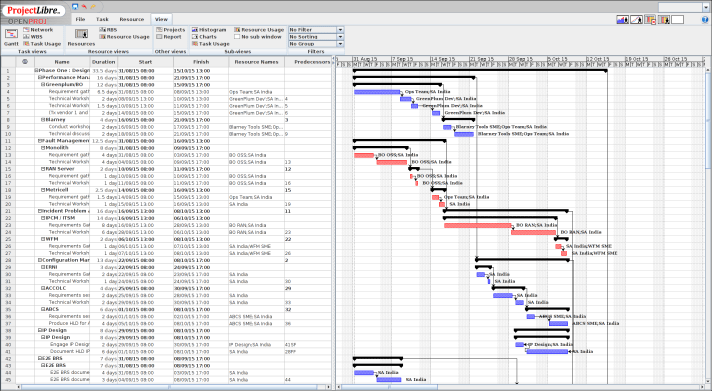
From a look and feel perspective, those who long for the joys of the Office 2010 RIbbon rather than the current Flat feel, ProjectLibre will take away some of the trepidiation of new software. Looking at the main menu items, it is clear that all ofthe major features are covered : a Gantt Chart, WBS and RBS, Cost per calculators, et al. ProjectLibre does not, as far as I can see, do any Earned Value calculations, as MS Project does. However, I’ve never used the Project software to do the EV calculations, so that ProjectLibre does not, or at least, I can not work out how to do it, is not an issue for me.
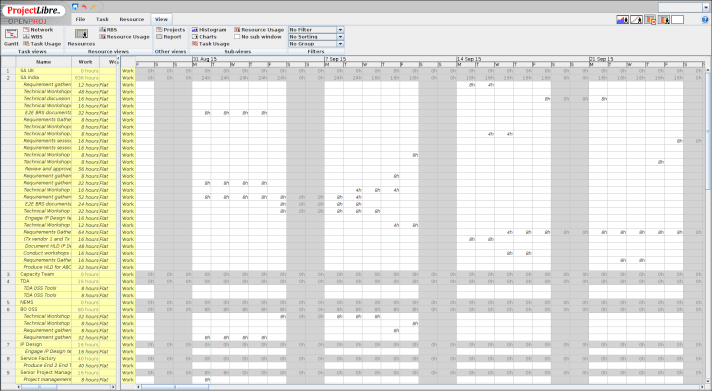
One area where Microsoft Project is excellent and leaves almost all other packages in the dark, including ProjectLibre, is the Help files. MS Project has a good collection of help topics “built in”, without having to go on line, as well as the masses of on line tutorials and suggestions. ProjectLibre help is, like the software itself, community driven. Take the EV Calculations; I have not been able to find anything within ProjectLibre on this topic, however there are lots of discussion groups about how it /may/ work, how it /should/ work, but I have not yet found anyting that says /this is how is actually works./ By comparison, Microsoft has this item: Analyze project performance with earned value analysis.
I am sure there are more topics in ProjectLibre that I have not yet discovered but for now, ProjectLibre will be my non Microsoft Project sopftware of choice.
 Mark Daniels