
For the last three years my main device has been a Sailfish powered Jolla. The original Jolla launch video can be seen here on You Tube. It is excellent.
For those of you unaware of Jolla, a group of Nokia engineers, who were released when Microsoft acquired the handset division of Nokia, formed a new company, Jolla, to exploit and develop Meego, which Nokia released on the excellent N9.
Jolla went public on 6 July 2012, announcing its intention to develop new smartphones that used a gesture-oriented swipe interface corresponding to former Nokia’s Harmattan UI experience. They named their operating system Sailfish, which is a result of Mer and includes a gesture-based user interface developed using the Qt, QML and HTML5, as did Nokia’s N9.
One of elements of the ecosystem is the harbour.jolla.com site, which is devoted to submitting, managing and selling applications at the Jolla Store. Consumers can install available software directly on their Sailfish devices. Software can be submitted on a free or commercial basis, using either the Sailfish OS or Android OS applications.
The Jolla Harbour and Jolla Store support only free applications. Sailfish OS is able to run:
- Sailfish-native apps;
- Android apps using built in Sailfish OS compatibility layer the Alien Dalvik from Myriad Group;
- MeeGo-native apps if its user’s interface is usable under Sailfish interface;
- in general all Linux apps compiled for Sailfish device or binaries with RPM storage standard, also in console mode or as a non-graphic terminal.
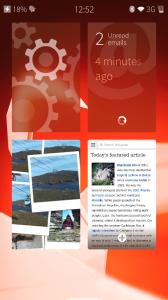 Just as Nokia’s were able to be used out of the box, without using the user manual, Jolla’s Sailfish is intuitive, logical and most importantly, simple. There are no deep dive hierarchical menus to navigate. Information or user options are where they need to be, and either usually located at either of the two sides or top or bottom, just one swipe away. Having used my partners Android occasionally, Sailfish is refreshingly straightforward where Android is unnecessarily complicated. I’ve added another Jolla video about the UI, here.
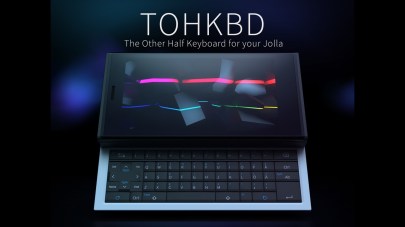 The hardware itself is also uncomplicated. A removable battery, 32gig MicroSD card slot, the usual Bluetooth, Camera, 2G/3G/4G and WiFi. Interestingly, Jolla also promotes a concept they call “TOH: The Other Half”. In essence, third party hardware, usually the back cover to the Jolla phone, which can be used as hardware extension for various purposes. It has an NFC and power connection to the main smartphone, it may have it’s own RAM, CPU, software or hardware, and can influence smartphone performance as an easily replaceable accessory or extension, for example change appearance and ambience settings, or connect the hardware keyboard.
So far there are a variety of back covers of differing colours that contain bespoke ambiances, ring tones, colour palettes etc. There is also one particular item which attaches a full, pull out keyboard inspired by the 9000 Communicator, but with a sliding operation, but probably best seen on the E75.
My partner has an Android device. An HTC. The HTC10 to be exact. It does….. Android stuff. Just like the Lenovos, Google, Sony, Motorolas and all the other bland, boring Android devices. There is essentially nothing to tell one Android device from another.
My Jolla is different. It works wonderfully well. It will be a sad day when this device finally dies.
 Mark Daniels